Use of Funds History Report

The Use of Funds History Report:

  • Includes each transaction, user, document number, date and time posted, ACCS affected, and how that entry affected the allocation as it relates to funds control; the only transactions that reduce or increase the available balance are those that have an amount to the right of the BD. Other transactions may only affect the CM, OB, AD, RR, or EX.
  • Can be a large cumulative report; may be pulled by date range and/or ACCS to look at certain transactions.

To run this report, select Funding Subsystem>Funding Reports>Funding History Reports>Use of Funds History Report within the IFMIS Main Menu.

Enter the beginning date for the period to be reported (or leave the entry blank to report from the beginning of the BFY) and the ending date for the period to be reported (or leave blank to report through the current date). Click Begin. Enter the ACCS information for desired allocation(s). Click Begin.
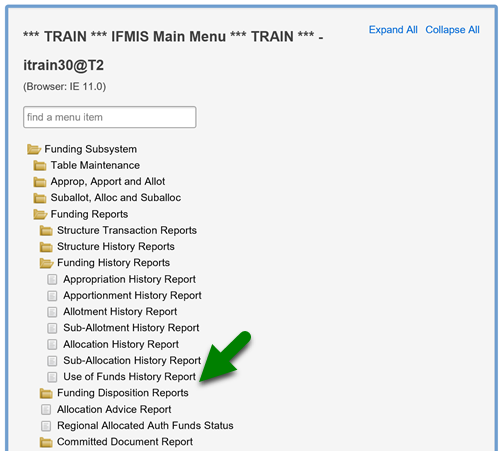
Screenshot of IFMIS Main Menu folder structure with an arrow pointing to Use of Funds History Report subfolder; path to subfolder is Funding Subsystem>Funding Reports>Funding History Reports>Use of Funds History Report