Signing and Submitting a Quarterly Performance Report
Once both of the report forms have a status of either "Complete" or "NES," the Quarterly Performance Report can be signed and submitted to FEMA. A Recipient user must have Sign/Submit access for Performance Quarterly Reports to be able to sign and submit them.

Sally will show you how she signs and submits a Quarterly Performance Report.

Scroll down to see slideshow captions.

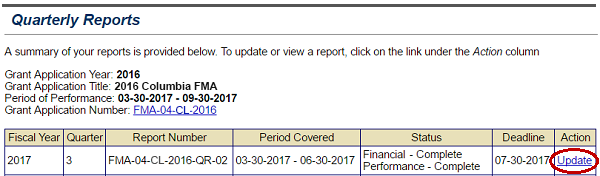
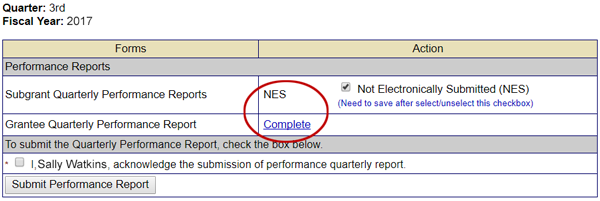
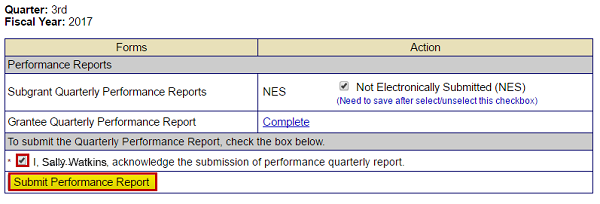
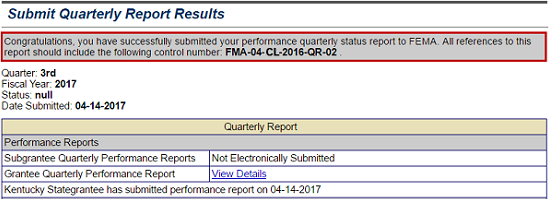
Select the update link to the right of the quarterly report package you want to sign. The status of the Financial and Performance reports are listed. See Appendix for alt text description.Both the Grantee Quarterly Performance Reports show Complete status. The Subgrant reports show NES status. See Appendix for alt text description.Select the signature box (checked) to acknowledge the submission of the quarterly performance report, then select the Submit Performance Report button (emphasized). See Appendix for alt text description.A submission congratulations message (emphasized). Status of the Performance and Financial status reports is listed.  See Appendix for alt text description.
Slideshow element Start button is disabledSlideshow element Back button is disabled1 of 4Slideshow element forward button with cursor onButton to move to end of a Slideshow with cursor on
Listen to Sally

To access the 2016 Columbia FMA Quarterly Performance Report that I need to submit, I will select the Update link in the Action column on the Quarterly Reports screen. Select this link for the full text of the image.
Listen to Sally

We are not submitting any Subgrant Quarterly Performance Reports, so the NES, or Not Electronically Submitted, status is shown. The Grantee Quarterly Performance Report has a "Complete" status link because the report has been uploaded into eGrants. I can now sign and submit the report to FEMA. Select this link for the full text of the image.
Listen to Sally

To sign and submit the Quarterly Performance Report, I will select the signature checkbox in the Performance Reports section and then select the Submit Performance Report button. Select this link for the full text of the image.
Listen to Sally

I receive a confirmation that the Grantee Quarterly Performance Report has been submitted to FEMA. Select this link for the full text of the image.